Charting the World's Food Data: Building the FAOSTAT MCP Server
Every great voyage starts with a question. Mine was simple: why should querying the world's most comprehensive agricultural database feel like deciphering a Poneglyph?
The UN Food and Agriculture Organization (FAO) maintains FAOSTAT, a treasure trove of data covering crop production, trade, food security, agrifood systems emissions, forestry, and more, across 245 countries and territories, stretching back to 1961. It's one of the most valuable public datasets on the planet for anyone working in agriculture, food policy, or climate research.
But accessing it? That's where the sea gets rough. The FAOSTAT API is powerful, but it speaks in domain codes, dimension filters, and nested JSON responses. Researchers and analysts the people who need this data most, often end up writing brittle scripts or clicking through clunky web interfaces. I wanted to change that.
The Idea: Let AI Do the Navigating
What if you could just ask for the data? Not write API calls. Not memorise domain codes. Just say: "What were the top 10 wheat producing countries in 2022?" and get an answer.
That's the promise of the Model Context Protocol (MCP), an open standard that lets AI assistants like Claude, Cursor, Codex and Windsurf discover and use external tools. Instead of a human learning the API, you teach the AI, and the AI serves anyone who asks.
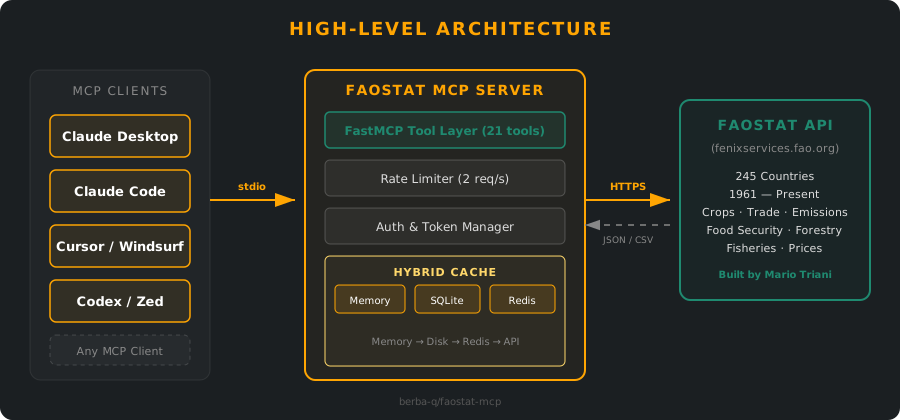
So I built the FAOSTAT MCP Server: a Python server that wraps the entire FAOSTAT API into 21 discoverable tools. Connect it to any MCP-compatible client, and suddenly the world's agricultural data is a conversation away.
21 Tools Across 4 Categories
The server exposes four categories of tools, designed to mirror how a researcher actually explores data:
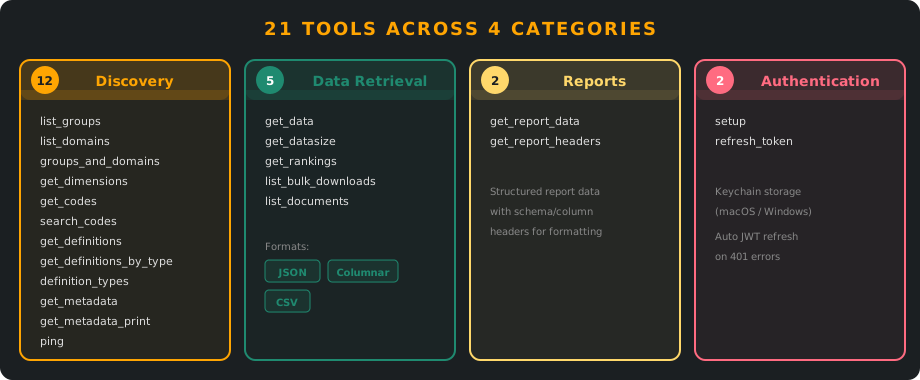
Discovery & Metadata (12 tools)
Before you can query data, you need to know what's available. Tools like faostat_list_groups, faostat_list_domains, and faostat_search_codes let the AI assistant explore FAOSTAT's hierarchy from top-level groups down to individual country and commodity codes. The search tool even handles disambiguation: if "rice" matches multiple codes, the assistant asks you to clarify before proceeding.
Data Retrieval (5 tools)
The core of the server. faostat_get_data fetches actual statistics with flexible filtering by country, year, commodity, or any combination. It supports three output formats: JSON objects, compact columnar JSON, or CSV for direct export. There's even a faostat_get_datasize tool to estimate query size before fetching — because nobody wants to accidentally pull 2 million rows into a chat window.
Reports & Documentation (4 tools)
Structured report data, report headers, bulk download listings, and related documentation. These are the tools that turn raw data into context.
Authentication (2 tools)
One-time setup and automatic token refresh. Credentials are stored in your system keychain (macOS/Windows) or a secured config file (Linux) no plaintext passwords floating around.
The Three Treasure Chests of Cache
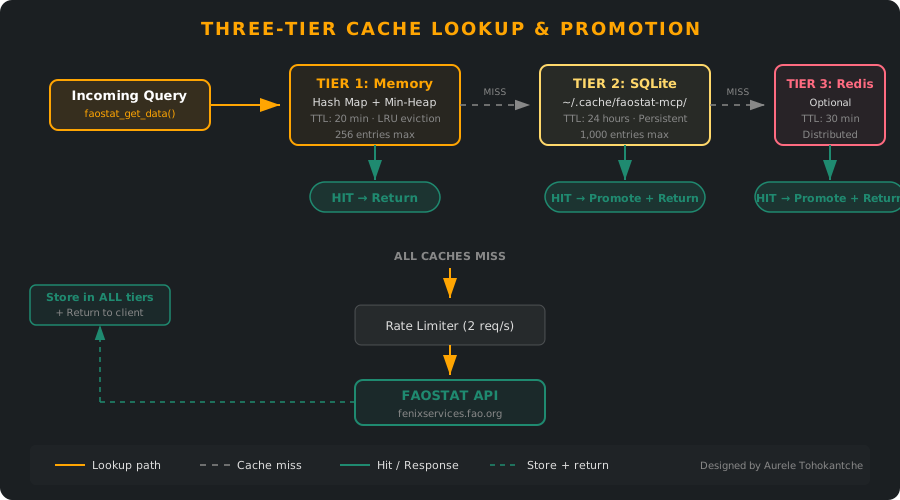
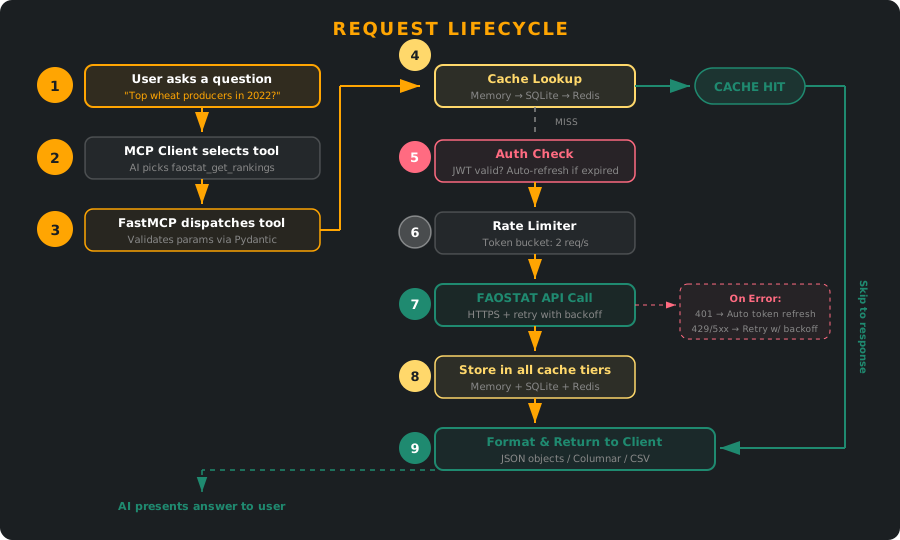
One of the features I'm most proud of is the three-tier hybrid caching system, designed in collaboration with my good friend Aurele Tohokantche (He's AWESOME!). When you're querying a public API that serves the entire world, you need to be a good citizen — and caching is how you do it.
Tier 1: In-Memory Cache
A hash map with min-heap TTL tracking. 20-minute default lifespan, LRU eviction when full. The fastest treasure chest answers repeat questions instantly within a session.
Tier 2: SQLite Disk Cache
Stored at ~/.cache/faostat-mcp/cache.db with a 24-hour TTL. This is the secret weapon: it survives server restarts. If you asked about wheat production yesterday, the answer is still warm today. No external infrastructure required — just SQLite doing what it does best.
Tier 3: Redis Cache (Optional)
For multi-user or high-volume deployments. 30-minute TTL with graceful fallback if Redis goes down, the server silently drops to disk and memory caches. You never notice.
The lookup order is: Memory → Disk → Redis → API call. Hits at lower tiers are promoted upward, so the most-requested data migrates to the fastest cache automatically.
Respecting the Seas: Rate Limiting & Resilience
FAOSTAT is a public resource. Hammering it with requests isn't just rude... it could degrade service for researchers who depend on it! The server enforces a 2 requests-per-second limit using a token bucket algorithm, completely transparent to the user.
On top of that, there's automatic retry with exponential backoff (powered by tenacity), transparent JWT token refresh on 401 errors, and custom exceptions (FAOSTATAuthError, FAOSTATRateLimitError, FAOSTATServerError) that give the AI assistant clear signals about what went wrong and whether to retry.
The Crew Behind the Build
No pirate sails alone. Aurele Tohokantche is a really good friend, and collaborating with him on this project was a genuine pleasure. He took the caching story from "works on my machine" to production-grade, designing and implementing the entire hybrid caching architecture: the SQLite disk cache, the Redis integration, and the promotion logic that ties all three tiers together. His engineering instincts and attention to detail are what make the server robust enough to publish with confidence.
And none of this would exist without Mario Triani — an absolute legend. Mario built the FAOSTAT API itself, the very foundation this entire project stands on. Without his vision and craftsmanship in making the world's agricultural data accessible through a clean, well-structured public API, there would be nothing for us to wrap, cache, or serve to AI assistants. We owe him a huge thank you. Grazie, Mario!
Building something meaningful with people you respect? That's the real treasure.
Where It Lives
The FAOSTAT MCP Server is open-source and published across multiple registries:
Getting started is one line:
uvx faostat-mcpOr add it to your MCP client config:
{
  "mcpServers": {
    "faostat": {
      "command": "uvx",
      "args": ["faostat-mcp"]
    }
  }
}
It's also listed on the official MCP Registry, so compatible clients can discover it automatically.
What You Can Ask
Once connected, the kinds of questions you can explore are vast:
- "What were the top 10 wheat-producing countries in 2022?"
- "Show me food security indicators for Ethiopia from 2015 to 2020"
- "Compare maize yields between the USA and Brazil over the last decade"
- "What are greenhouse gas emissions from agriculture in Sub-Saharan Africa?"
- "Which countries are most dependent on food imports?"
No code. No domain codes. Just questions and answers.
"The sea is vast. The data is deep. But with the right crew and the right tools, any island is within reach."
— Griffiths, Log 002